WINDOWS PC READY · ANDROID COMING SOON

Download. Install.
Start creating.

Get official PAK FLOW for your device directly from flow.pakaitools.com. Follow the quick setup guide, launch your creative workspace, and generate high-impact AI media with unmetered speed.

No website login required to download · PakFlow-Final-Setup.exe (92.7 MB) · Step-by-step SmartScreen guide included
OFFICIAL APPLICATION RELEASES

Choose your platform

Download the latest official package directly in your browser. Fast direct server delivery with zero wait times.

Downloads Active
FOR WINDOWS PC / LAPTOP

Windows App

PakFlow-Final-Setup.exe
READY
File: PakFlow-Final-Setup.exe
Package Size: 92.7 MB
Compatibility: Windows 10 / 11 (64-bit)
Release: v3.0 Final Production
FOR ANDROID MOBILE

Android APK

PakFlow Mobile Edition
COMING SOON
Platform: Android 9.0 and above
Format: Standalone APK
Status: In Final Optimization
Release: v3.0 Mobile Edition
Windows: Download PakFlow-Final-Setup.exe → Open/run the installer → Click "More info" & "Run anyway" if SmartScreen prompts. Android: The mobile APK build is in final testing and will be released here soon.
STEP-BY-STEP SETUP GUIDE

Watch how to install & get started

Follow the quick official walkthrough to install PAK FLOW on your Windows PC and activate your creative session.

Facing unusual activity or high traffic limits?

If you encounter high demand or server notices: Connect VPN → Mexico or United States → Refresh your workspace. If needed, click Clear Flow Cache inside settings.

Quick Help Video
WINDOWS INSTALLATION WALKTHROUGH

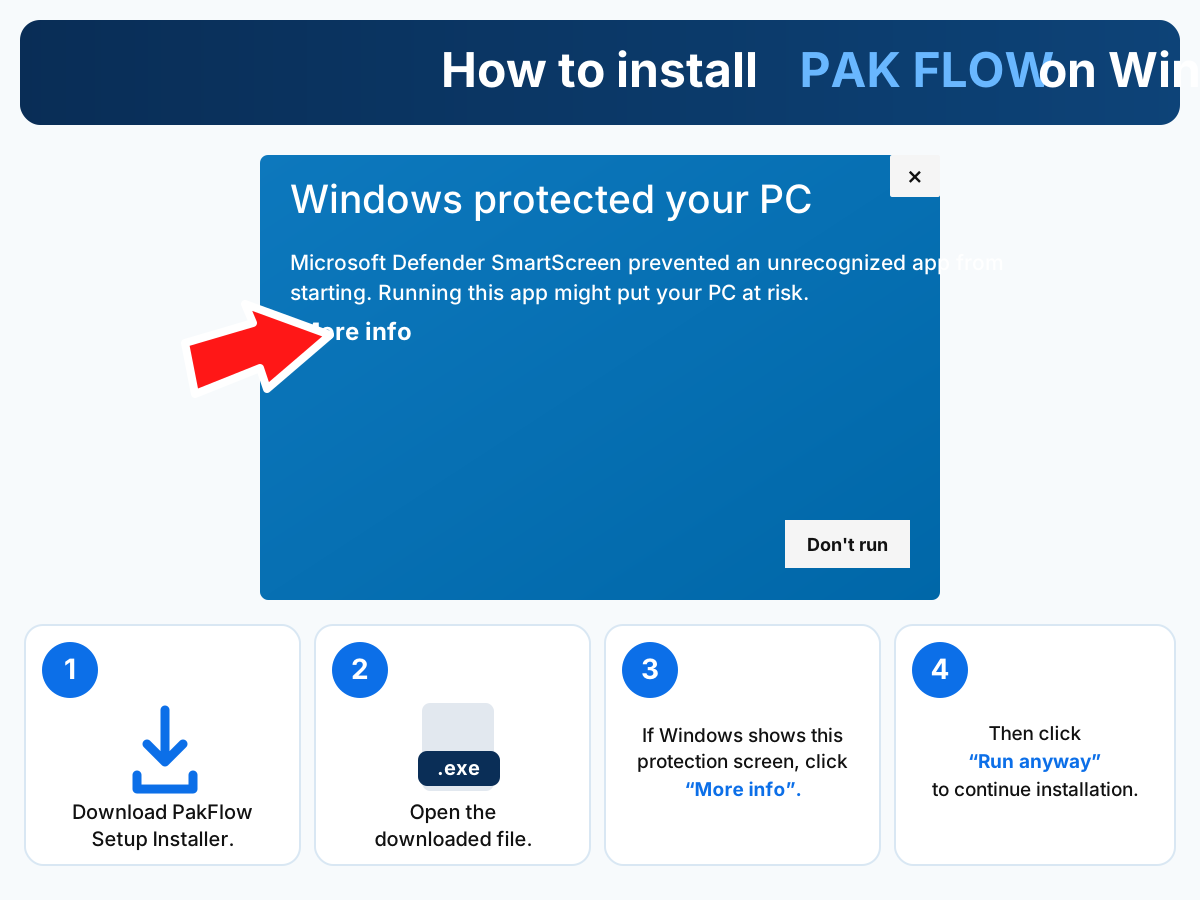
If Windows SmartScreen displays protection

Because PAK FLOW is an independent release downloaded through your browser, Windows Defender SmartScreen may display a prompt. Follow these 4 simple steps:

Windows SmartScreen installation instructions highlighting More info and Run anyway buttons
Click "More info", then select "Run anyway".
1
Download PakFlow-Final-Setup.exe

Click the Windows download button above to save the 92.7 MB installer to your computer.

2
Open the downloaded file

Open PakFlow-Final-Setup.exe from your Downloads folder or browser tray.

3
Click "More info"

When the blue "Windows protected your PC" window appears, click the underlined More info text.

4
Click "Run anyway"

The Run anyway button will appear at the bottom. Click it to launch the setup wizard and complete installation.

ABOUT THE PLATFORM

Flow & Gemini in one unified powerhouse

Access your complete generative AI workflow inside PAK FLOW with optimized performance and secure session handling.

AI Video Generation

Render high-definition AI videos with smooth camera motions, cinematic physics, and dynamic audio cues in real-time.

Gemini Intelligence

Brainstorm scripts, prompt structures, and multi-modal creative expansions with built-in Gemini AI capabilities.

Uncapped Speed

Direct cloud pipeline with accelerated GPU allocation for fast preview and queue generation without local hardware limits.

Private Credentials

Sign in using the private access credentials issued with your account. Sessions remain encrypted and persistent.

HELP & SUPPORT

Frequently Asked Questions

Everything you need to know about downloading, installing, and running PAK FLOW.

No. You can download PakFlow-Final-Setup.exe directly from this website without creating an account or logging in. Once installed on your PC, you will use your issued app credentials inside the desktop app.

When you click Download Windows App, check your browser's download manager or your computer's default Downloads folder for PakFlow-Final-Setup.exe (~92.7 MB).

The Android APK is currently in final testing and performance optimization. It is labeled Coming Soon on this portal and will be published for direct download as soon as QA tests conclude. In the meantime, use the Windows PC edition.

SmartScreen warns users about newly downloaded executable files that are not distributed via the Microsoft Store. Simply click "More info" and then "Run anyway" to proceed with the official installer.

PAK FLOW runs on Windows 10 and Windows 11 (64-bit). A stable broadband internet connection is recommended for cloud AI video rendering and model communication.

The official verified domain is flow.pakaitools.com, operated by PakAITools. Always verify you are downloading files from this domain.